Trainer CRM Features: What to Look For Before You Buy
Not all fitness CRMs are built equally. This checklist separates must-have features from nice-to-haves—so you don't pay for complexity you don't need or end up missing the basics that actually matter.
How to Use This Checklist
For each feature category, we've listed must-haves (features that directly impact revenue or daily workflow) and nice-to-haves (useful, but not dealbreakers). Any CRM you seriously consider should satisfy all must-haves in the categories relevant to your business.
Use this during demos and free trials. If a vendor can't show you a feature working in a trial account, assume it doesn't exist—or doesn't work well enough to matter.
Client Management
FitFloww includes all must-havesMust-Have
- Contact database with client profiles
- Session history and notes
- Progress photo gallery
- Body measurement tracking
- Goal tracking and milestones
- Custom intake forms
Nice-to-Have
- Custom tags and segments
- Client health history
- Emergency contact fields
- Document storage (PAR-Q, waivers)
Scheduling
FitFloww includes all must-havesMust-Have
- Self-service client booking portal
- Automated SMS + email reminders
- Buffer time between sessions
- Cancellation policy enforcement
- Recurring session support
- Google Calendar sync
Nice-to-Have
- Group class management
- Waitlist management
- Multi-trainer shared calendar
- Room/equipment booking
Payments & Billing
FitFloww includes all must-havesMust-Have
- Stripe integration (credit/debit cards)
- Automated invoicing
- Session package billing
- Recurring subscription billing
- Payment reminder automation
- Revenue reporting
Nice-to-Have
- Multiple payment methods (ACH, PayPal)
- Refund management
- Discount codes
- Partial payment plans
Client Portal
FitFloww includes all must-havesMust-Have
- Mobile-first design (iOS + Android)
- Self-service booking
- Workout program access
- Progress tracking view
- Direct messaging
- Payment history
Nice-to-Have
- Custom branding (your logo, colors)
- Habit tracking
- Video call integration
- Push notifications
Workout Builder
FitFloww includes all must-havesMust-Have
- Exercise library with video demos
- Custom workout creation
- Program templates
- Assign workouts to clients
- Set/rep/weight tracking
- Client performance history
Nice-to-Have
- AI program generation
- Periodization planning
- 1RM tracking
- Exercise substitution suggestions
Business Analytics
FitFloww includes all must-havesMust-Have
- Monthly revenue dashboard
- Client retention rate
- Session completion tracking
- Upcoming renewals/expirations
- No-show rate tracking
Nice-to-Have
- Revenue forecasting
- Client lifetime value
- Referral source tracking
- Marketing ROI metrics
Communication
FitFloww includes all must-havesMust-Have
- In-app client messaging
- Automated session reminders
- Broadcast messages (send to all clients)
- Email notification system
Nice-to-Have
- Two-way SMS
- Automated check-in sequences
- Re-engagement campaigns
- SMS from platform number
Security & Compliance
FitFloww includes all must-havesMust-Have
- HTTPS encryption
- GDPR and CCPA data subject request support
- Secure payment processing via a PCI-DSS provider
- Data export/portability
- Role-based access controls
Nice-to-Have
- Two-factor authentication
- Audit logs
- Automatic backups
- SOC 2 certification
Red Flags: Walk Away If You See These
These are non-negotiable deal-breakers. If a CRM has any of these, keep looking.
- No mobile client portal (or requires a separate app download with extra fees)
- Email-only reminders — SMS is required for real no-show reduction
- No built-in payment processing — forces you to use Venmo or manual invoicing
- Per-session transaction fees on top of monthly subscription price
- Client data stored only locally (no cloud sync or backup)
- Setup takes more than 1 hour per the vendor's own documentation
- No free trial or money-back guarantee
- Support only via ticket system with 48+ hour response times
Pricing: What to Actually Compare
Total Cost of Ownership
Base subscription + transaction fees + add-on module costs. Many platforms advertise a low monthly rate but charge 2–4% on every payment you collect or require paid add-ons for basic features.
Price Per Client
Divide the monthly cost by your client count. A $99/month plan for 100 clients ($0.99/client) is better value than a $49/month plan for 30 clients ($1.63/client) if you're growing.
ROI Calculation
Calculate what one recovered no-show per month is worth at your session rate. For most trainers, the CRM subscription pays for itself before you finish the first billing cycle.
FitFloww Pricing at a Glance
| Plan | Price | Clients | Best For |
|---|---|---|---|
| Starter | Free forever | Up to 5 | New coaches getting started |
| Professional | $49/month | Up to 30 | Independent trainers scaling up |
| Business | $99/month | Up to 100 | Growing studios & small gyms |
| Enterprise | $249/month | Unlimited | Large gyms & franchises |
FitFloww Checks Every Must-Have Box
Client management, scheduling with SMS reminders, Stripe payments, mobile portal, workout builder, and analytics — all included. Free for up to 5 clients, no credit card required.
Frequently Asked Questions
Related Resources
Best CRM for Personal Trainers 2026
Top 7 platforms compared side-by-side
Personal Trainer CRM Software
FitFloww feature deep-dive
Why Trainers Need a CRM in 2026
Business case and ROI breakdown
Set Up in 30 Minutes
Step-by-step setup guide
ROI Calculator
Calculate your business impact
FitFloww Pricing
All plans and features compared
Trusted by Industry Leaders
See the FitFloww Experience
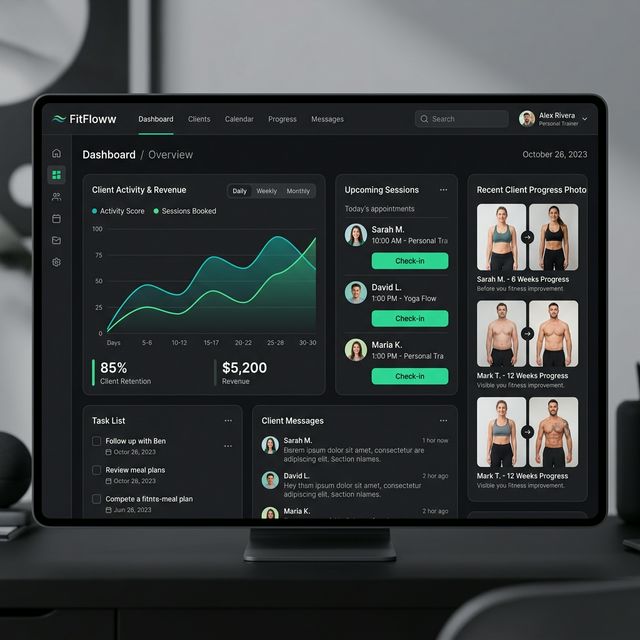
Don't just take our word for it. Explore the same interface used by over coaches and studio owners to manage high-growth fitness businesses.